Going further into the relationship between ITAM and ITSM, let’s look at how Discovery & Inventory tools feed your Asset Repository and CMDB.
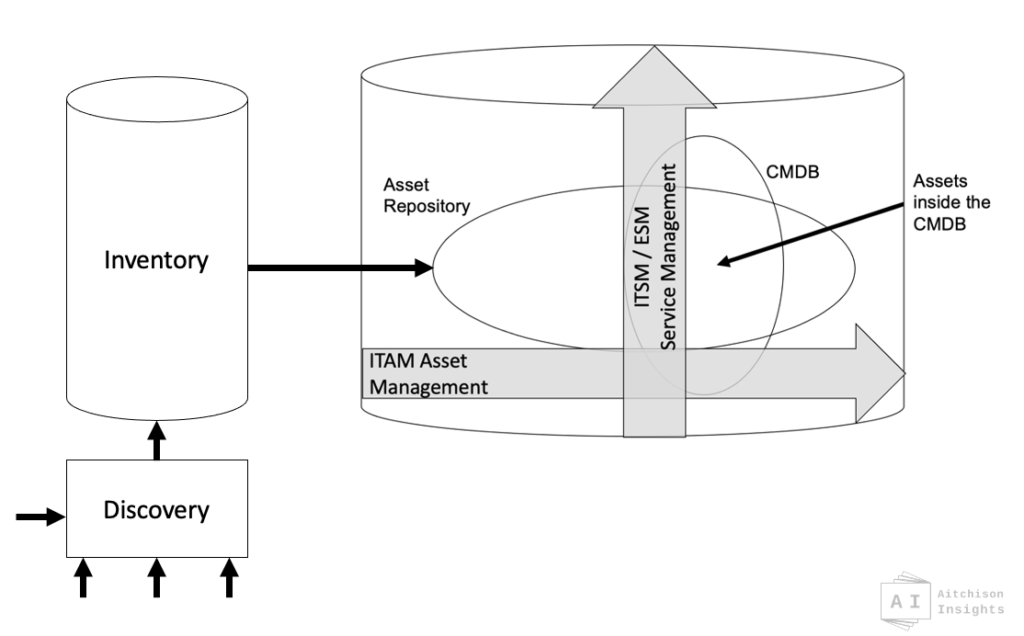
I wrote recently about when, and how, and if IT Assets should appear in your CMDB. It pretty much laid out the relationship between ITSM/ESM and ITAM:-
- ITAM manages the life of an asset, though an asset lifecycle, with asset data in the asset repository.
- ITSM manages configuration items, used to deliver IT services.
- IT Assets move in and out of being ‘configuration items’, at various times appearing – and then disappearing – from the CMDB.
Here’s that diagram again.

I called this the Combined Asset Service Database (CASDB). There are other names used.
Not all of them rude.
Now lets look at where Inventory and Discovery fit into this picture. Can we do a version of this diagram which shows the relationship with Discovery tools and the existence of an Inventory? And does that open yet more questions we need to answer? Let’s find out.
First we need some definitions (provided here in Ian-words not taken from Best Practice books).
What is Discovery
Discovery is the use of tools to find and capture information about the configuration of technology things.
Discovery finds connected devices. physical or virtual, on-prem, in-cloud or at-home. Those devices are usually many of your IT assets. Printers, routers, hubs, laptops, servers, IoT devices. Discovery can’t find technology that isn’t in some way connected and is not discoverable. (But people can).
If you were being pedantic you could perform manual discovery by walking up to a computer, running a series of queries and config lookups and typing all those values into a spreadsheet. But that would be madness because there are a world of good Discovery tools out there that ‘sniff’ across your network or up in the cloud. Sometimes they install agents, sometimes not, but all feed back lots of information about your discovered devices into a database.
That information is considerable. hundreds if not thousands of settings, config, specification values for each device. Down to bios settings, up to installed software or services, into Registry.
So if we can say that Discovery tools “Discover” many of your IT Assets, then we could also say that they build a comprehensive inventory of those assets.
What is Inventory
Inventory is the complete set of all the configuration information Discovered about all your Things.
Discovery builds and updates Inventory.

Often these two are the same thing – a discovery tool holds the Inventory of the things it has discovered. We could show this as one box, but I prefer it as two.
Moving on, of course that Inventory feeds into your asset repository, adding discovered configuration information to your Assets. And those Assets also move through the CMDB when required.
And, yes, if you are not ‘doing ITAM’, it’s exactly the same for ITSM-only.
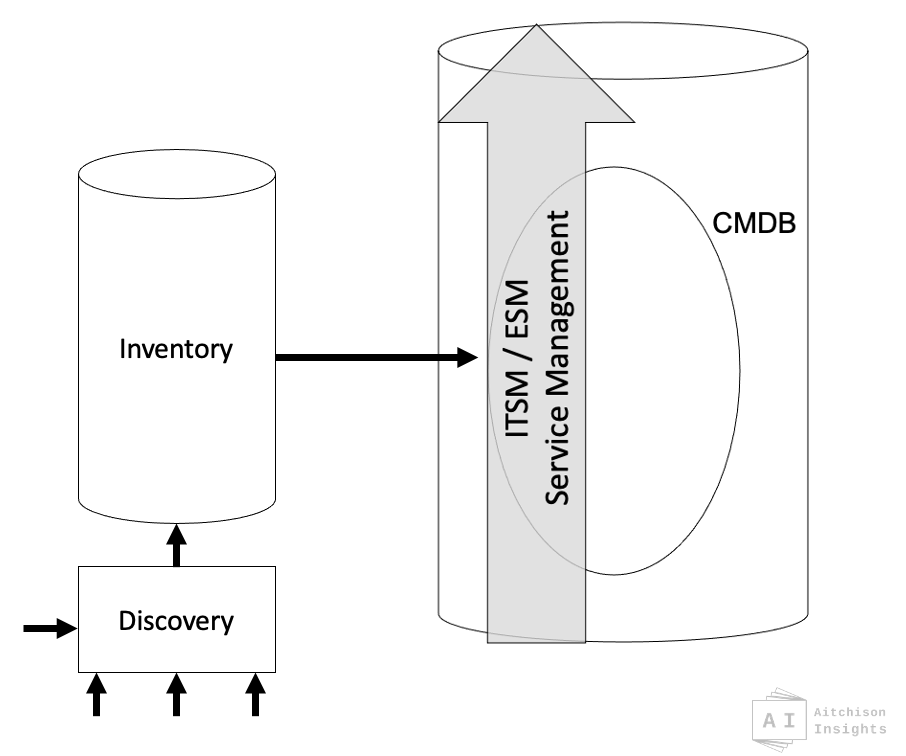
I’ll keep drawing these are both ITAM&ITSM together (what I called the CASDB), but please appreciate that the same applies whether it is ITAM&ITSM, ITAM-only or ITSM-only. In all cases, you need Discovery and Inventory to feed ITAM and/or ITSM.
Can’t This All Be One Thing?
Now that we see where they fit, why keep these apart? Perhaps your Inventory is potentially also your Asset Repository as well? Can’t you just use your Discovered Inventory as your Asset Repository and your CMDB?
Nope and again, no. For three big reasons.
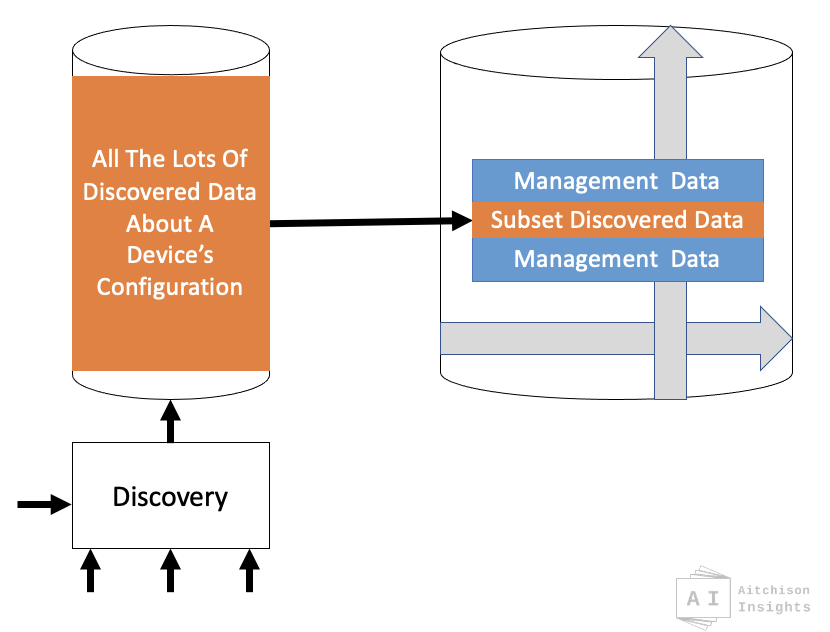
1 – Asset (and Service) Management only require a small subset of all the complex Inventory configuration data, and then must add a set of non-inventory, management data that cannot ever be discovered and cannot exist in an Inventory.
2 – In the real world you are likely to have multiple inventories and multiple discovery tools, not one.
3 – There is significant value in being able to see, monitor and alert on any difference found between Discovered and Managed configuration values.
Let’s look at those three points in more detail.
1. ITAM and ITSM only need a subset of Inventory data.
The asset repository and CMDB holds management information about assets to enable them to be managed, as assets. Purchase date, cost, status, also some configuration dimensions that impact purchase value, such as memory, processor, disc, speed. Also, if they are CI’s you also add Service relationships, business criticality, maybe SLAs. Dependency relationships and more.
Some of those dimensions do come from Discovery and are found in Inventory. However much of the above does not come from discovery tools.
And , in reverse, discovery inserts thousands of discovered current configuration values into inventory and you simply never need those in your asset repository. Asset Managers don’t care about current display language or bios settings about fan speed.
Put those two together, it’s a bit like this.
2. All the many Discovery Tools and Inventory databases.
Every organisation has many different discovery tools, across data center, endpoints, cloud (AWS, and Azure and more). More and more tools are popping up which hold their Inventory in cloud stores, and many organisations also have on-prem tools as well. Also many dedicated discovery tools include Management functions to change configurations of the devices that they discover.
But it makes the picture look a bit like below. Multiple Discovery tools. Multiple Inventory Databases. All trying to squeeze into your asset repository or your CMDB. Head spin.
Many Into One Can Be Difficult
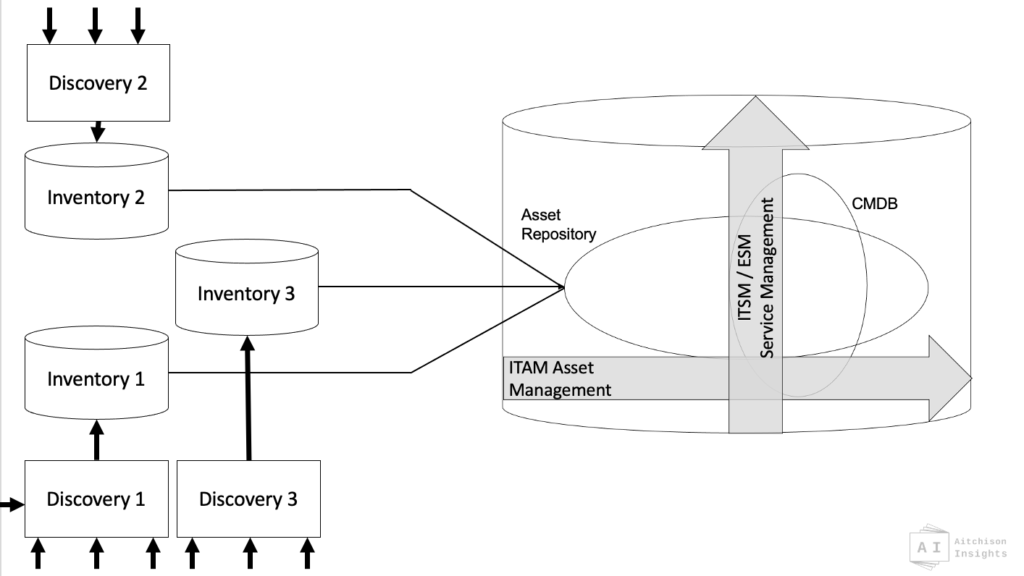
Pretty nasty huh? And in the real world, there’s often a lot more than three. It can be 5, 10, 20 separate sources feeding your asset repository and CMDB.
Those multiple lines coming into your asset repository, and thus also your CMDB, are the big weak point in the whole story. I’ve highlighted it in red below.

Some vendors get around this be building a consolidation/mapping layer in their ITAM&ITSM tools. A mapping, transformation, loading rules based layer to make it easier to bring additional sources and their selected data values onboard.
Other vendors get around it by building a separate combined inventory as shown below A consolidated, federated Inventory. This suits organisations that appreciate prebuilt/low-choice options.
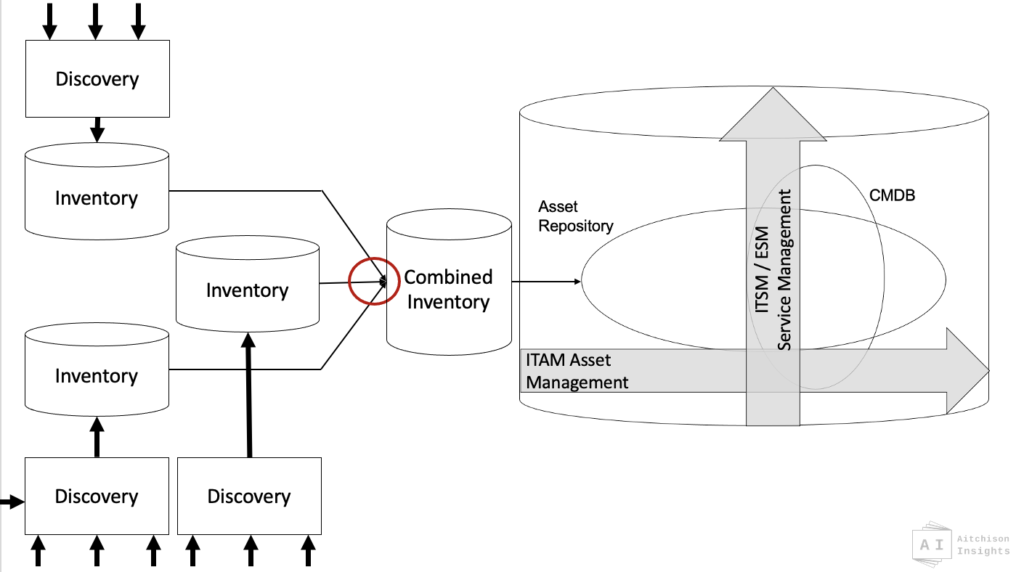
But as you can see from the red highlight, this moves the point of risk and complexity from one place to another. So although this brings some advantages, it doesn’t completely resolve the potential for complexity and error at that junction point.
What’s the solution?
Well… There is no (perfect) solution! Apply either more-people-effort or more-technology-spend, or a combination of both. So go into this with your eyes wide open and a focus on that convergence point. That’s where the big risk of failure lies. (There be dragons!).
AND, finally, the last thing. Why do you even need this separation at all? Why care? That’s addressed in the 3rd and final point.
3. Managing the Delta Between Discovered and Managed.
Well, here’s where the magic happens. In either ITAM or ITSM you get massive value and benefit from having a comparison possible between the MANAGED asset/CI values, and those recently DISCOVERED.
MANAGED = “WHAT IT SHOULD BE”
DISCOVERED = “WHAT IT IS”
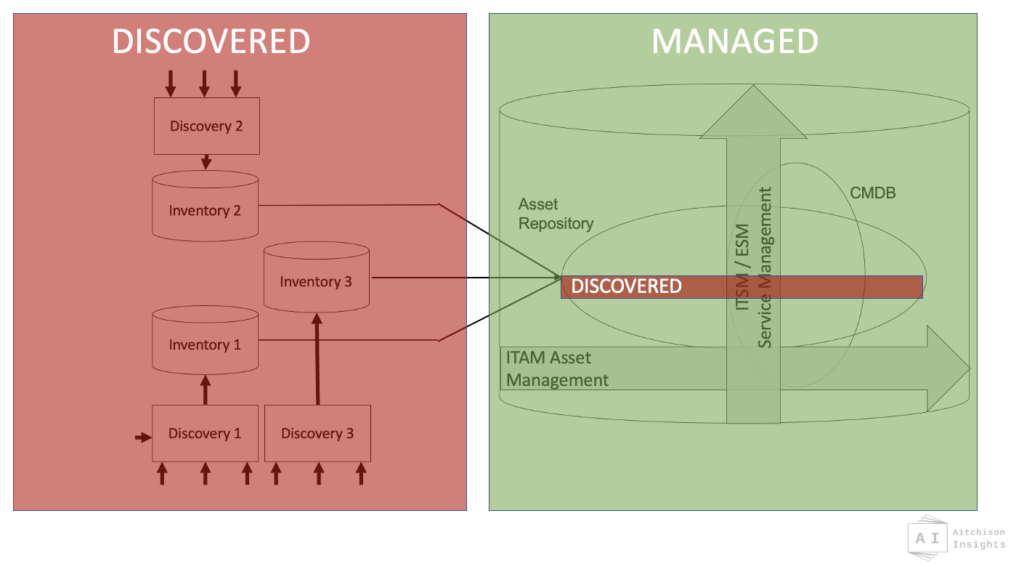
In an ideal, non-changing state, Managed should equal Discovered for any Asset/CI.

If you follow ITSM change practices to correctly and carefully upgrade the memory in a laptop from 8GB to 16GB, then you would expect Discovery to confirm that it has 16GB discovered. That’s important. Did Managed make it back into Discovered OK?
But then, if one day the Discovery update comes back showing only 4GB in that 16GB laptop then that’s important too. You need to know that. Knowing whether “things are not what they should be” is a byproduct of good ITAM and ITSM.
It’s not that 4GB is wrong, it is that 4GB no longer not matches 16GB and that needs management decision and action. You need both views.
Well, this was supposed to be a little one and it grew and grew. A bit more than just how discovery and inventory feed ITSM and ITAM.
Did it make sense? Was this useful? Let me know, stick something back on my LinkedIn post or in Twitter.
Have a nice day.


0 Comments