Here’s a topic that seems to come up a lot. Let’s talk about the relationship between ITAM, IT Assets, the ITSM / ESM CMDB and, uh, Particle Physics.
These are questions that come up frequently when you first start to combine ITAM and ITSM people and tools in an organisation. If you, dear reader, are starting to combine ITSM and ITAM then article is – hopefully – one for you.
The first question that seems to comes up often is…
- “Are Assets = Configuration Items, and are Configuration Items = Assets”?
then that leads to…
- “Can All Assets and All Configuration Items be stored in the CMDB”?
and then…
- “Is the Asset Repository basically the same data store as the CMDB”?
All fall under the broad subject of whether ITAM Assets should be in the ITSM CMDB?
Let’s answer these questions. All as one person’s opinion of course (mine). Dear reader, your opinion may differ. That’s OK.
What Thing Is That? Is it an Asset or a Configuration Item?
First. An Asset is a thing. It has a fundamental value, probably a financial cost. In ITAM-land, an asset is a thing of value that is managed throughout its life (that’s an asset-lifecycle).
Assets, following their asset lifecycles, live within an Asset Repository.
In ITSM-land, there are “Service Assets”, they can be many things (configuration items, documents, knowledge articles, licenses… anything that helps an IT Service operate and deliver value). Today we’re focussing only on Configuration Items (CIs).
A Configuration Item (CI) is a thing within those service definitions that can be configured, and is used to deliver value within a Service. Like, say, a router.
CIs – and other Service Assets – exist in a Configuration Management Database (CMDB), with relationships to other CIs and Service Assets that combine to provide the Services that deliver IT Service Value.
It Looks A Bit Like This
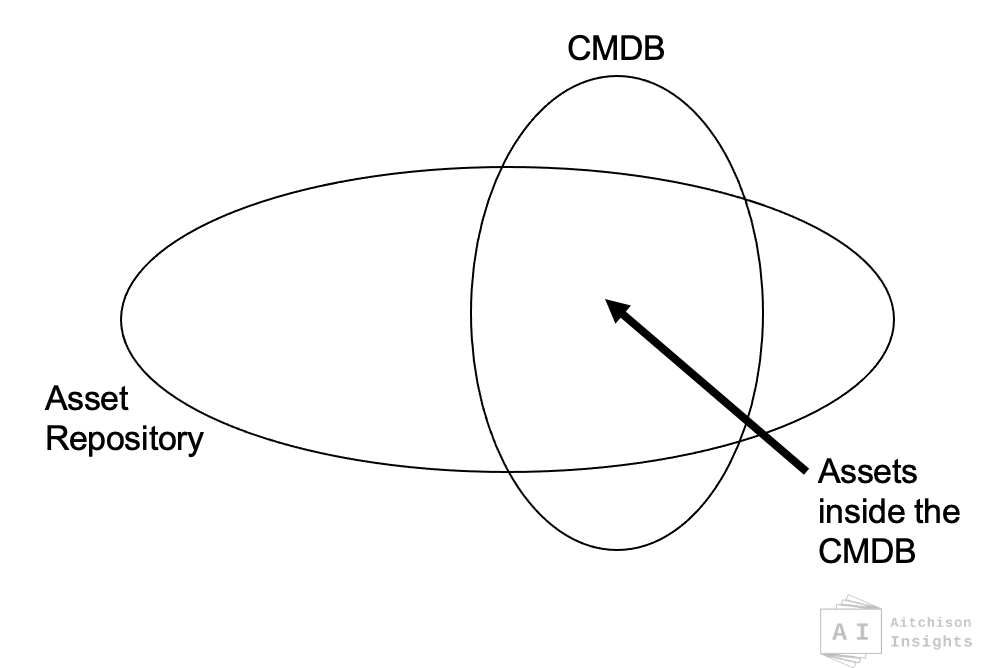
All IT things with a financial value are Assets. They have probably been purchased for a known quantity of money. IT Assets are managed through IT Asset Management (ITAM) activities in an asset repository.
And all configurable things that are involved in delivering IT service value are Configuration Items. Configuration Items are managed through Service Management (ITSM/ESM) activities in the CMDB.
With me so far? Good. So…
- All Assets should exist before, during and after any time within the CMDB.
- If an Asset is being used to deliver value through Services, it will also be a configuration item in the CMDB.
- Some Assets may enter, exit and reenter the CMDB at various stages in their life as they are included in service-value and then removed (perhaps, into a stock room or replaced by a new version).
- Some Assets never appear in the CMDB. That’s OK.
- Although most configuration items are assets, it is possible that you may have configuration items that are not being managed by your ITAM program and processes. There may be Configuration Items that are not IT Assets.
IT Assets Have a Lifecycle
Another way to answer this is to look at the concept of the asset lifecycle. Before, during and after any time as part of the CMDB, an IT Asset is following an Asset Lifecycle.
Here’s an example:-
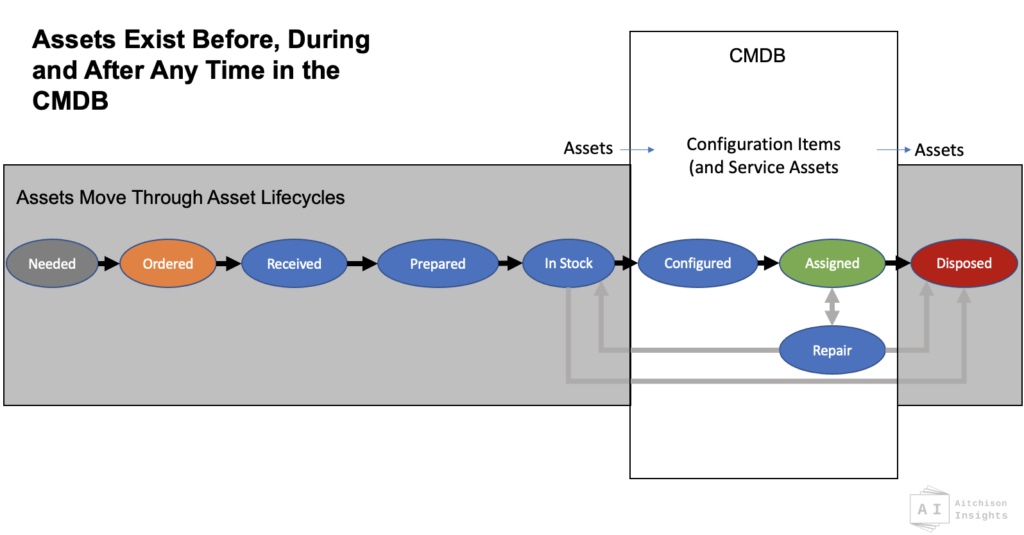
See how, in the life of an asset, it reaches a point where it becomes available to be included within the CMDB, and passes that point at a later stage in its life.
In a different article I will dig into the functional differences and critical relationships between a CMDB, an Asset Repository, and an Inventory. Look for the link to appear here when I do that one.
As you can see, if you take a step back, it all starts to look a bit like below.
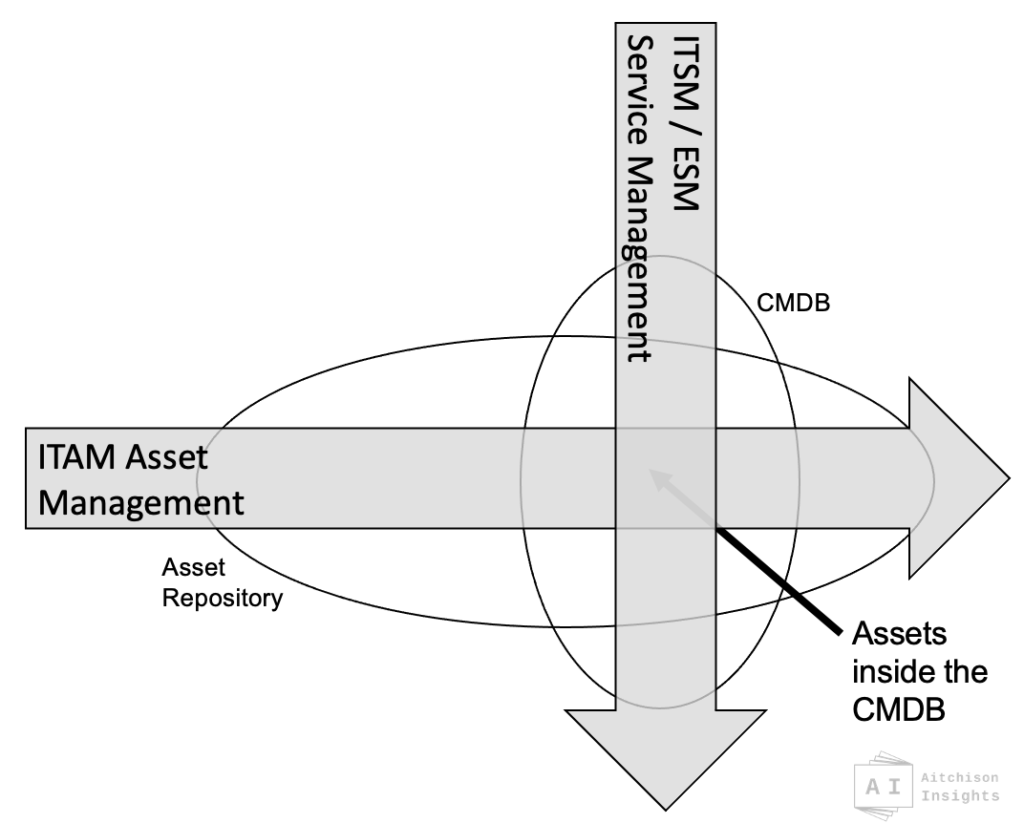
So, to answer Question 1: Are all Assets also Configuration Items, are all Configuration Items also Assets?
NO
Not all Assets are Configuration Items
Not all Configuration Items are Assets (although most usually are)
Question 2: Should All Assets Be In The CMDB?
NO – A CMDB is not a Asset Repository
Looking at the diagram above and the answer to question 1 above, clearly the answer is NO. Some assets are not configuration items or Service Assets, so should not be a part of the CMDB. Being a configuration item is a temporary state for some assets.
HOWEVER, here’s an important point…
Question 3: ‘Is the Asset Repository the same physical store as the CMDB ‘?
YES – it’s mostly the same data, just used in different ways at different time.
Ah, I mentioned data store above, see? Since the physical (or virtual) ‘thing’ of the asset itself is literally the same thing in both asset and CI, why keep the same data about the same things duplicated in two locations. That’s effort and risk and complexity. We hate those things.
So let’s call the one data store something like the Combined Asset-Service Database or CASDB for now. (IAITAM and ITIL surely have a better name, I’m not looking right now, let’s roll with that for now).
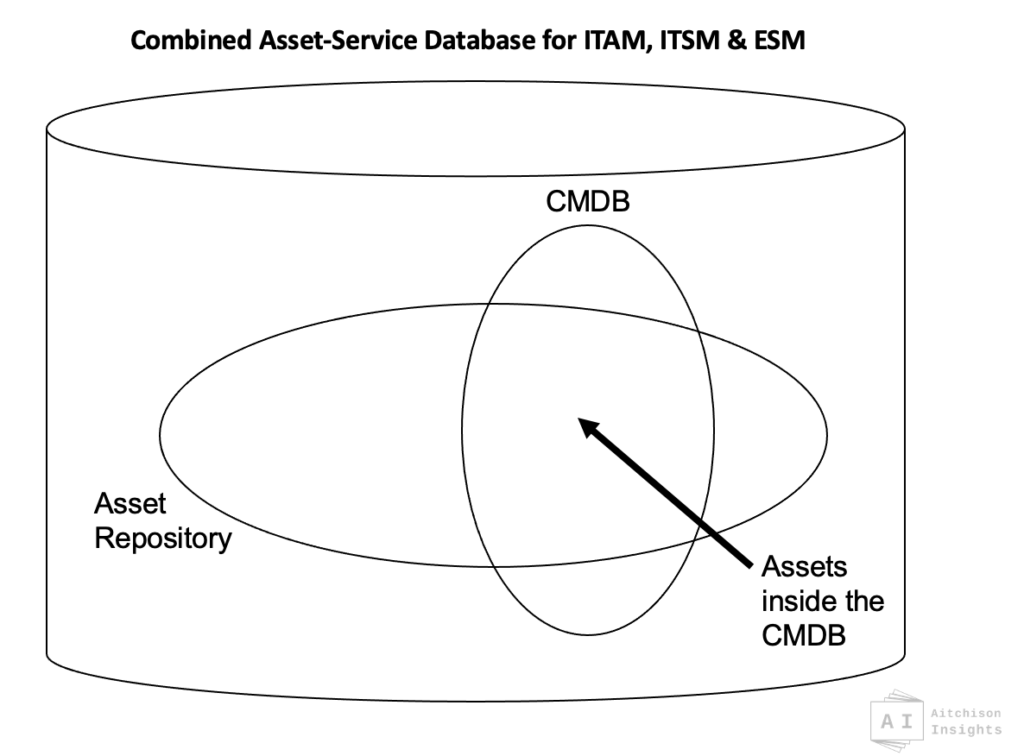
Being a Configuration Item in the CMDB is just a state, a flag or some position that your assets move through. And that same CASDB data store holds all of your asset information whether they are ‘in the CMDB’ or not.
So, YES, the same data store can act as BOTH your asset repository and your CMDB, as long as your have relevant capabilities and practices around the data.
With a bit of toolset and working practice design, you can usually convert your CMDB into a CASDB, and thus act as both a CMDB and also an Asset Repository.
From what I’ve seen however, it’s very difficult – maybe impossible – to convert an asset repository to also become a CMDB. Thats one for another article some time.
Subtle Complexity.
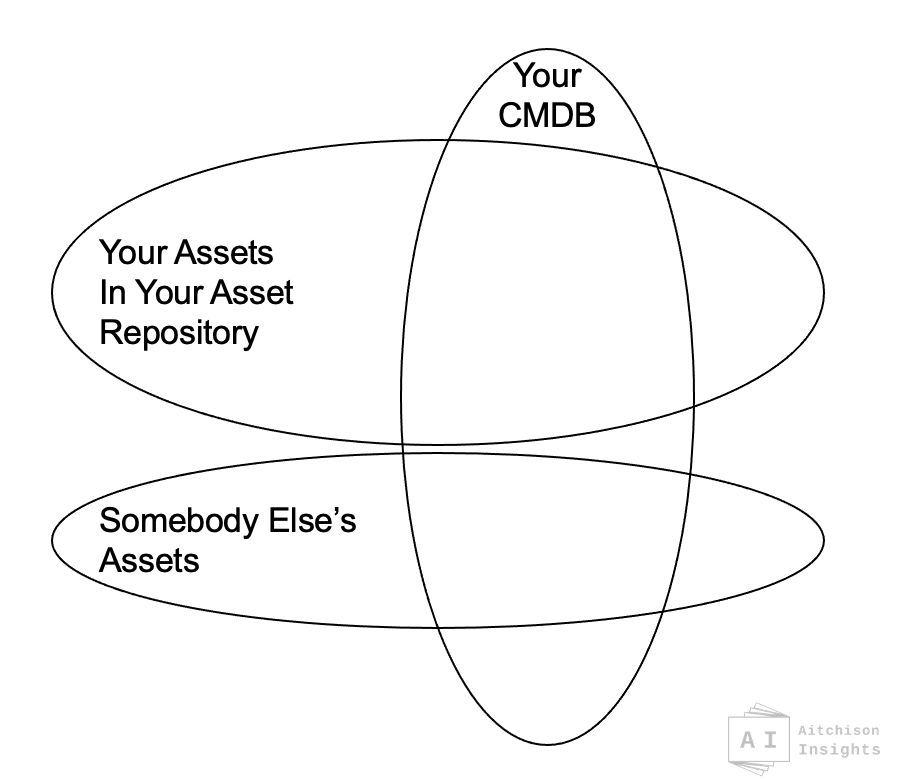
To make it more complex, it is theoretically possible that not all Configuration items in the CMDB are your assets. They could be someone else’s
For example, it’s very common to use cloud infrastructure, IaaS, PaaS, even SaaS make up parts or all of your IT Services, and you may need to identify that you have a specific critical service that is dependent on a high availability load balancer in a cloud vendors data center that you need the cloud vendor to manage in line with your change processes. Or what about the DC itself?
A second example: if you have work from home staff, their home/domestic family broadband routers may now be a critical component in your delivery of many services to those individuals. You could have these routers shown in your CMDB, but they surely are not your IT Assets unless you buy your staff their home internet infrastructure.
So… it starts to look like this…
Finally, The Bit About Particle Physics
Next let’s get really crazy. Heisenberg’s Uncertainty Principle talks to how, in Particle Physics, individual particles can exist in more than one unknown spin-state and that state is only set when you measure the spin of the particle. And there were into the world of Shroedinger’s Cat and all that stuff. I’m not going there today, that’s covered in plenty of conference presentations along with other cliches of boiling frogs and ‘definitions of insanity’.
But, IT Assets can also have two simultaneous and contradictory states.
IT Assets exist in asset management practices before they exist in the business. They can be assets and not-assets, both at the same time.
If there is an open order for 100 new laptops, those laptop asset records need to individually exist as waiting to be delivered, possibly each individually linked to configuration deployment and request workflow, even though each physical asset has not arrived. If there is a license requested to one individual, that license can be defined, pre-allocated and reserved to that user as a future asset, even before the purchase has taken place.
So, it’s a little bit like particle physics (kind of). Assets can have two simultaneous states : they exist, before they exist.
They also exist… after they cease to exist. Dispose of an asset, you need to show the full lifecycle and disposal of that disposed asset. It no longer exists, yet it still exists as a disposed asset.
How Was That For You?
Right, that’s got all the words out for today. Hopefully this one was useful and went some way to answering the question of Should ITAM Assets Be In The ITSM CMDB?
Let me know your thoughts as usual, you can comment here, back on Twitter or over on LinkedIn.
Front Image by Memed_Nurrohmad from Pixabay


0 Comments